

Structured data is the code that tells a search engine what your law firm is, where it operates, and what it handles. Done right, it earns rich results, feeds a clean version of your firm into Google’s understanding of the web, and keeps your details consistent everywhere they appear. It is a one-time technical addition that keeps working every time an engine reads the page. This guide covers the schema types that matter for attorneys, a copy-paste block to start from, and an honest look at what schema will and will not do.
That honesty matters, because this corner of legal marketing is full of overclaiming. Google’s own case studies credit structured data with real gains in classic search, including an 82% higher click-through rate for one publisher, per Google’s case studies. What schema does not do is buy you AI citations, and the proof of that is below.
Mark up the firm with LegalService and each attorney with Person, and use schema for rich results and entity clarity rather than as an AI-citation shortcut.
Google confirms no special schema is required for AI answers, so the value is a clean, accurate entity, not a ranking trick.
What Structured Data Does for a Law Firm
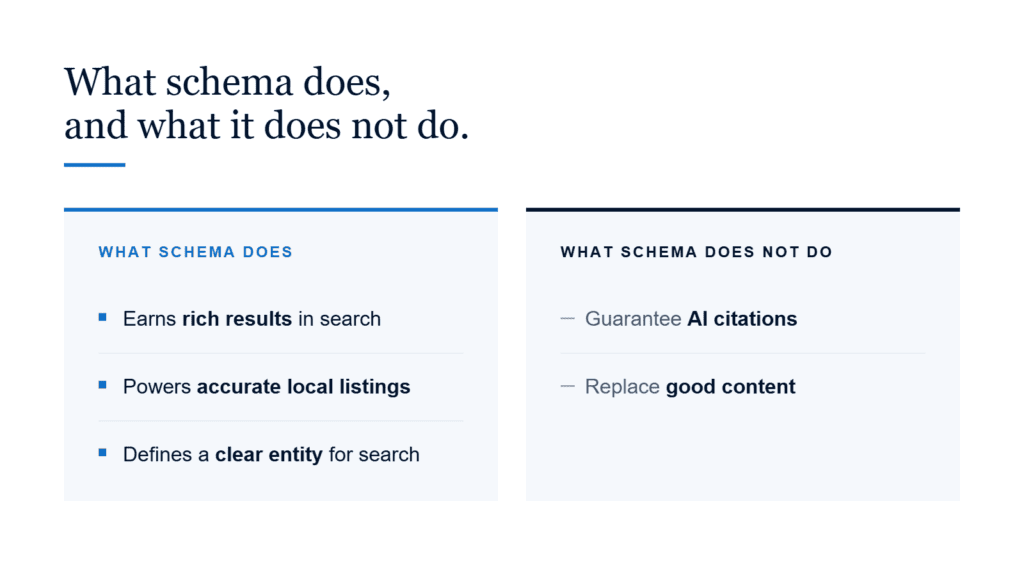
Schema hands an engine a labeled map of your firm instead of leaving it to infer the details from your text. That supports three real things: eligibility for rich results, accurate local and map listings, and a clean entity Google can match to your firm across the web. For a firm, the payoff is a listing that shows the right name, location, and practice areas rather than a guess. None of it requires new writing, only a block of code in the page head that mirrors what visitors already see.
A LegalService block, for instance, lets your hours, service area, and phone surface directly in a listing rather than leaving Google to scrape them from the page. Cleaner input tends to produce cleaner output.
The Schema Type Most Firms Get Wrong
The most common mistake is using a generic LocalBusiness or Organization type when a firm should use LegalService, the subtype built for businesses that provide legal services. Start with the block below, swap in your real details, and connect each attorney with the Person type.
{
“@context”: “https://schema.org”,
“@type”: “LegalService”,
“name”: “Example Law Firm”,
“url”: “https://www.example-lawfirm.com/”,
“telephone”: “+1-555-123-4567”,
“address”: {
“@type”: “PostalAddress”,
“streetAddress”: “123 Main Street, Suite 400”,
“addressLocality”: “Austin”,
“addressRegion”: “TX”,
“postalCode”: “78701”,
“addressCountry”: “US”
},
“areaServed”: “Texas”,
“priceRange”: “Free consultation”
}
Keep the name, address, and phone identical to your Google Business Profile, because any mismatch tells the engine your data cannot be trusted.
The Schema Types Worth Having
Beyond LegalService, a handful of types carry weight. Person marks up each attorney with a job title and credentials, and note that Google’s old Attorney type is effectively retired, so use Person and link it to the firm. Organization with a subOrganization property handles firms that run more than one office.
FAQPage still helps engines read your answers cleanly, though Google now limits FAQ rich results to government and health sites. Review and AggregateRating describe your ratings, but Google suppresses self-serving star ratings on your own pages, so treat them as data rather than decoration. BreadcrumbList and BlogPosting round out your navigation and blog, and Article with a Person author supports each bio.
Add each type only where it fits the page. LegalService belongs on the homepage and contact page, Person on attorney bios, Article on blog posts, and FAQPage only where a real FAQ exists. Piling every type onto every page does not help and can blur which entity the engine should trust.
What Structured Data Will Not Do
Here is the honest part the marketing blogs skip. Google states in its own documentation that no special schema is required to appear in AI Overviews, and a 2026 Ahrefs study of 1,885 pages found that adding structured data produced no measurable lift in AI citations. Schema earns rich results and entity clarity, and both are worth having, but it is not a switch that makes ChatGPT or a Google AI answer cite your firm. Anyone selling schema as an AI-citation shortcut is selling something the data does not support.
Think of schema as making your firm easier to understand, not more likely to be recommended. The recommendation still comes from the substance of your content.
Structured Data and Rule 7.1
Schema is attorney advertising, so it falls under ABA Model Rule 7.1 the same as any other marketing you publish. A Review or AggregateRating block that inflates your ratings, a description that promises a result, or a board-certification claim you cannot support can create a compliance problem, not just a technical one. Mark up what is true and verifiable, keep your required disclaimers in place, and give your structured data the same review you give your visible copy.
Put Your Markup to the Test
After you publish, confirm the code actually works. Run each page through Google’s Rich Results Test, watch the structured-data report in Search Console for errors, and validate the syntax with the schema.org validator. Broken or mismatched schema can do more harm than none at all, so check it before you rely on it. Fixing an error the tool flags costs far less than discovering it after months of the engine reading bad data.
Where to Begin
If you are starting from nothing, add the LegalService block to your homepage first, then Person markup to each attorney bio. Those two cover the entities that matter most and take the least time. Layer in Organization, Article, and a genuine FAQPage as you go, and validate each addition before you move to the next.
Frequently Asked Questions
Does structured data help my law firm get cited by AI?
Not directly. Google says no special schema is required for AI Overviews, and controlled testing found no citation lift from adding it. Schema helps with rich results and entity clarity, which matter, but it is not an AI-citation shortcut.
What schema type should a law firm use?
Start with LegalService, the subtype built for firms that provide legal services, and add Person for each attorney. Avoid the retired Attorney type, and keep your name, address, and phone identical to your Google Business Profile.
Is the Attorney schema type still valid?
Not for Google’s purposes. Schema.org still lists it, but Google no longer honors the Attorney type, so use Person for each attorney and LegalService for the firm, connected by the worksFor property.
Where should each schema type go?
Put LegalService on your homepage and contact page, Person on attorney bios, Article on blog posts, and FAQPage only where a real FAQ exists. Avoid piling every type onto every page.
Where Lexicon Comes In
Structured data only works on top of content that already answers real questions clearly, and that is the part we handle. At Lexicon Legal Content, our JD-trained writers produce attorney-reviewed, answer-first pages and bios that give your markup something accurate to describe, and every piece is screened against ABA Model Rule 7.1 before it reaches you. Clean copy and clean structured data reinforce each other, so the words on the page hold up as well as anything wrapped around them.
If you want help getting your content and your markup to line up, see our law firm content writing or contact us to talk it through. You can reach our team any time at 877-486-8123.

David Arato, JD is the founder of Lexicon Legal Content, an attorney-owned legal content marketing agency serving law firms since 2012. He has built Lexicon’s editorial process around the same standard he sets for structured data: mark up only what is true, verifiable, and defensible under a state bar’s advertising rules. David is a frequent contributor to Attorney at Law Magazine and Attorney at Work and a recurring guest on legal marketing podcasts.