
Schema markup on a law firm website is rarely written by anyone at the law firm. Plugins and themes generate it, and it publishes claims about the firm that nobody there has read.
Open your best-performing blog post, view the page source, and search it for ld+json. Inside that block is a field naming whoever the site thinks wrote the page. On many law firm sites there is also a star rating, an aggregate score and a review count.
Most advice on schema markup and AEO for law firms starts with which types to add. This starts with what is already there, because the markup already on your site is the part carrying risk. Our complete guide to schema markup for law firms covers what to add and why.
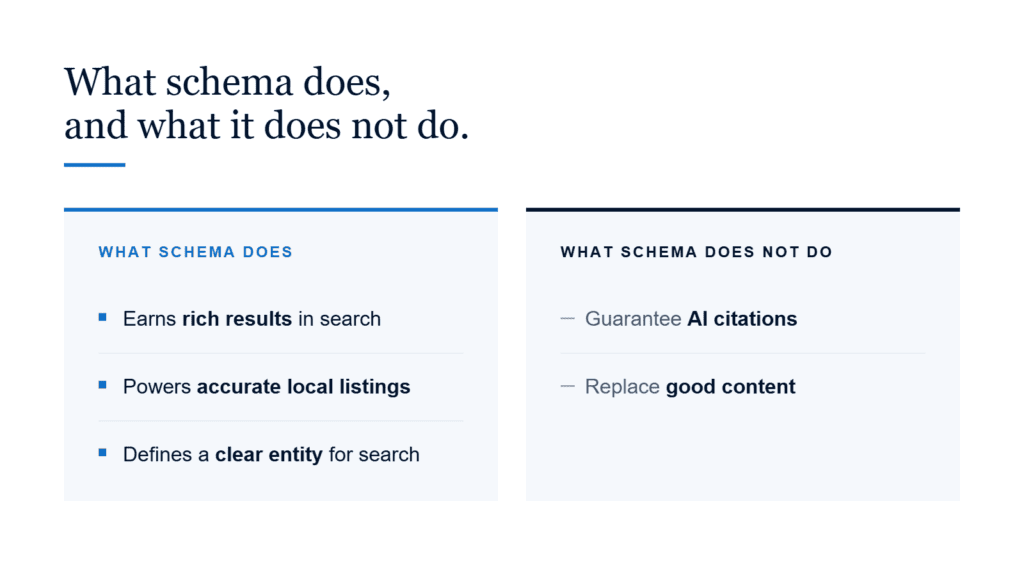
No schema markup is required for a law firm page to be cited in AI search, so the question worth asking is not which markup to add but which markup is already publishing a claim your bar rules hold you responsible for.
Review plugins routinely publish a star rating into a law firm’s structured data. The firm never sees it, and the firm is still answerable for it.
Does Schema Markup Get a Law Firm Page Cited in AI Search?
No schema markup is required for a law firm page to be cited in AI search. Google’s guidance on its AI features states that there is no special schema.org structured data a page needs to carry, and that a page needs only to be indexed and eligible for a snippet to appear as a supporting link.
That is worth sitting with, because it contradicts most of what gets sold to law firms. Adding LegalService markup does not make a page eligible for something it was not eligible for before. Adding FAQPage markup does not make an engine quote the answers. Structured data helps a machine parse a page it has already decided to read. It is not the thing that gets the page read.
Markup is not the lever, which is the same conclusion our criminal defense AEO audit reached from a different direction.
None of which makes the markup on your site harmless. It means the reason to look at your schema markup is different from the one you were given.
Product Schema: The Markup That Publishes a Star Rating About Your Firm
Review and testimonial plugins mark a law firm up as a Product so that a star rating can render, and that rating gets published in the page’s structured data whether or not anyone at the firm approved it.
The reason is mechanical. To display stars, a plugin needs something for the stars to attach to. Schema.org has no type for “law firm you can rate,” so plugins reach for Product. Into the code goes an aggregateRating block containing:
- A
ratingValue, usually a rounded average - A
ratingCount, drawn from whatever the plugin could reach - A
reviewCountthat frequently bears no relationship to the rating count - A
worstRatingfield left empty because the plugin had nothing to put in it
Plugins generate the description too. Lines about a law firm being trusted by hundreds of satisfied clients, or about a number of years of combined experience, assembled without anyone writing them.
Nobody at the firm typed any of that. It is still published, and it is still a communication about a lawyer’s services.
ABA Model Rule 7.2 requires that any such communication “include the name and contact information of at least one lawyer or law firm responsible for its content.” A rating your plugin publishes is a claim your firm is answerable for. Whether a 5-star average assembled from a rating count nobody verified satisfies your state’s rules is a question for your bar, not for your developer. The first step is knowing the rating is there at all.
Person vs Organization: When a Law Firm Is Marked Up as the Wrong Type
A law firm marked up with the Person type is using the wrong schema type. Google’s Article documentation is explicit on the point: use the Person type for people, and the Organization type for organizations.
The mistake is almost never deliberate. WordPress fills the author field with whatever account published the post, so when a law firm publishes under its own name, the firm’s name ends up sitting inside a Person object. The name is right and the type is wrong.
A law firm is an organization. An attorney is a person. Marking up a firm and marking up an attorney are different jobs, and our JSON-LD walkthrough covers both.
What the Author Field on a Law Firm Page Usually Says
The author value in a law firm page’s structured data frequently names no one a reader would recognise. Four values turn up again and again:
admin, or a variant of it, left over from the site build- A web designer’s login, created during development and never renamed
- An SEO agency’s account name, sitting in the field that tells an engine who wrote the page
- Nothing at all, because the
authorproperty is missing entirely
None of this proves a lawyer did not write the page. It proves that nothing on the page says one did. For a profession that sells judgment, that is a strange thing to leave to a default setting.
How to Check the Schema Markup on Your Law Firm’s Website
Open one of your firm’s posts, view the page source, and search it for ld+json. Then check four things in the block that appears.
- The
authorfield. Does it name a human being, your firm, or an account likeadmin? - The
@typeon that author. Is your firm typed as aPersonwhen it should be anOrganization? - Any
ProductorReviewblock. Is there one you did not put there, and does it publish a number? - The
dateModifiedvalue. Does it match when the page was actually last updated?
That takes about five minutes a page, and it is a different job from the one covered in our structured data checklist for attorneys.
Frequently Asked Questions
Does a law firm page need schema markup to be cited by an AI answer engine?
A law firm page does not need schema markup to be cited by an AI answer engine. Google’s guidance on its AI features states that no special structured data is required, and that a page needs only to be indexed and eligible for a snippet to appear as a supporting link.
What is a Product block doing on a law firm page?
A Product block on a law firm page usually comes from a review or testimonial plugin. It marks the firm up as a product so a star rating can display, and it often publishes an aggregate rating and review count that nobody at the firm reviewed or approved.
Should a law firm be listed as its own author?
A law firm should not be listed as its own author using the Person type. Google’s documentation reserves Person for people and Organization for organizations, so a firm credited as a Person is describing itself with the wrong type even when the name is right.
Can schema markup hurt a law firm’s website?
Schema markup can create a problem for a law firm when it publishes a claim the firm never approved. Review plugins commonly add an aggregate star rating to a page’s structured data, and that rating is a communication about a lawyer’s services whether or not anyone at the firm wrote it.
Product and publish an aggregate star rating into the page’s code.Person is using the wrong schema type, and an empty author field credits nobody at all.Schema Markup and AEO for Law Firms Starts With Reading Your Own Code
There is no markup configuration that earns a citation, so there is nothing to copy from the firms winning the answers. What there is, on a great many law firm sites, is a rating nobody at the firm wrote, published where nobody at the firm looks.
Read your own source before you add anything to it. Deciding what belongs in your schema markup, and what a plugin put there on your behalf, is the part worth someone’s attention.
Call 877-486-8123 or contact us online and read us your best-ranking page, or see the content work itself.

David Arato, JD is the founder of Lexicon Legal Content, an attorney-owned legal content marketing agency serving law firms since 2012. Lexicon writes attorney-reviewed content across criminal defense, personal injury, immigration, employment and family law, and publishes its own research on how AI search engines cite legal websites. David is a frequent contributor to Attorney at Law Magazine and Attorney at Work and a recurring guest on legal marketing podcasts.